


Check in by QR. Wait anywhere. Hear when it’s your turn.
One QR at the door, the queue on every patient’s phone, and a clear call in the room.
- QR check-in
- Updates on the patient’s phone
- Spoken calls
- Doctor-wise display
- Runs on any Windows PC or TV
- No proprietary hardware
- Set up on a 30-minute call
- Built by Kaelix Technologies
Watch ValloraQ run an OPD.
How a modern OPD runs its waiting room with QR check-in, spoken calls and one screen per doctor.
Not a render. A real hospital OPD, running ValloraQ today.
Photographed January 2026. Doctor names blurred for privacy.
The queue lives on your patient’s phone, not at your desk.
A QR code at the entrance gives every patient a token. Their phone shows how many are ahead and tells them when they’re next. When it’s their turn, the room hears it too.
- QRPatients join from the door, no paper tickets
- →Live place in line on their own phone
- !Told when they’re next, and when it’s their turn
Follow one patient, step by step.
- 1Scan the QRThe patient joins from the entrance
- 2The desk callsNext brings up the following tokens
- 3Their turnThe phone and the room both know
 ValloraQ
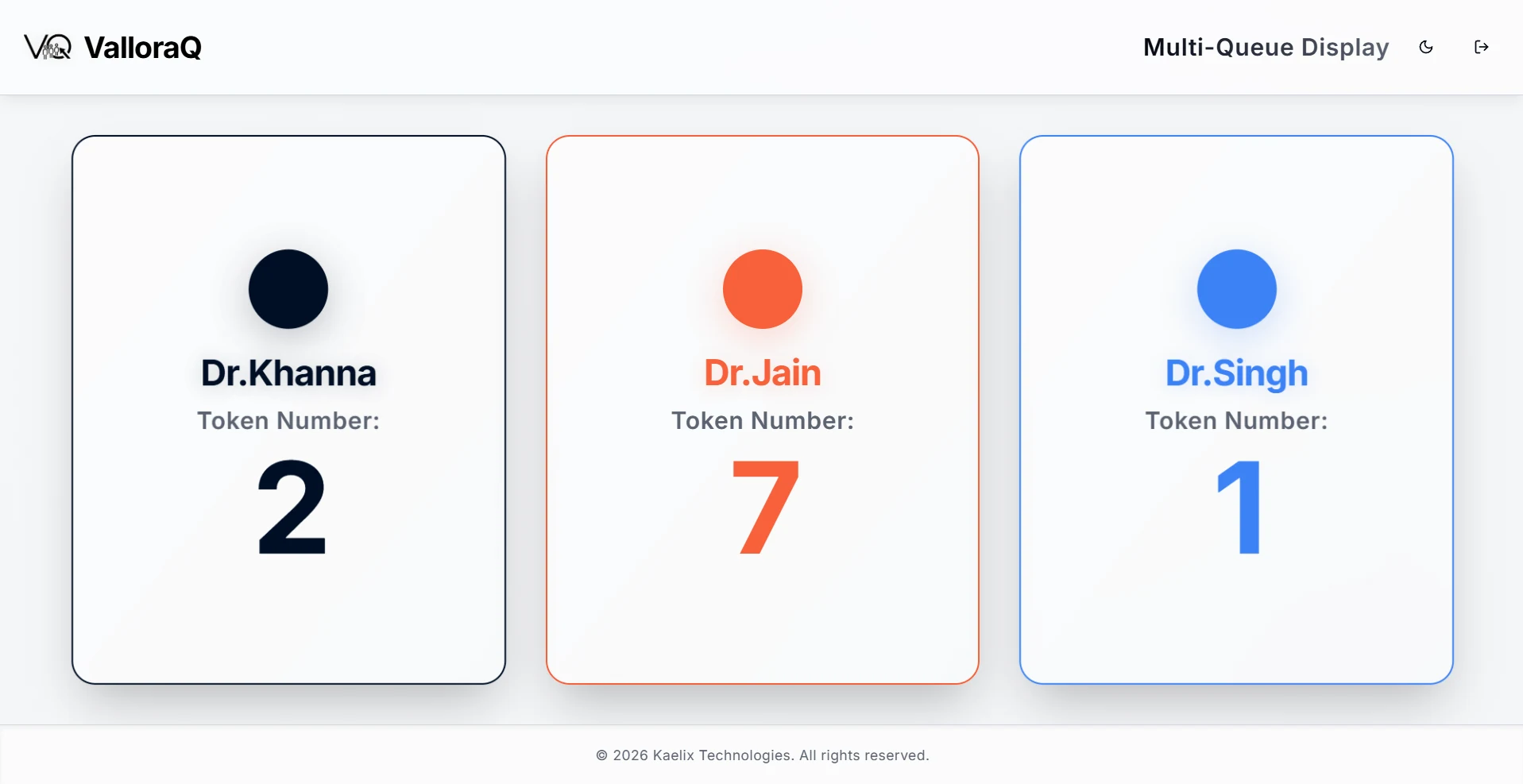
- Dr. KhannaToken Number:2
- Dr. JainToken Number:7
- Dr. SinghToken Number:1
Interactive demo with sample tokens. The phone view and notifications are illustrations of the patient experience.
Set up your doctors on a call.
A 30-minute call. You leave with queues named after your doctors.
Everything from the front door to the doctor.
One system for check-in, calling, the waiting-room screen and the numbers behind it.
AI voice announcements
Natural-sounding calls of every token and doctor, so nobody misses their turn. A chime is there too.
QR check-in and phone updates
Patients join from their phone and follow their place live. No paper tickets, no crowding at the desk.
A queue for every doctor
Run several queues at once from one desk. Built for clinics, hospital OPDs and diagnostic labs.
Waiting-room display
A customisable screen showing each doctor’s current token in real time, with notices when you need them.
Analytics
Wait times, peak hours and staff performance, so the schedule follows the patients.
Cloud-based
Open it from anywhere. No hardware to install, with automatic updates and backups.
Tokens, not names
The waiting-room screen shows a doctor and a token number. Patients know when it’s their turn, and nobody else learns who is waiting to see whom.
The real screens
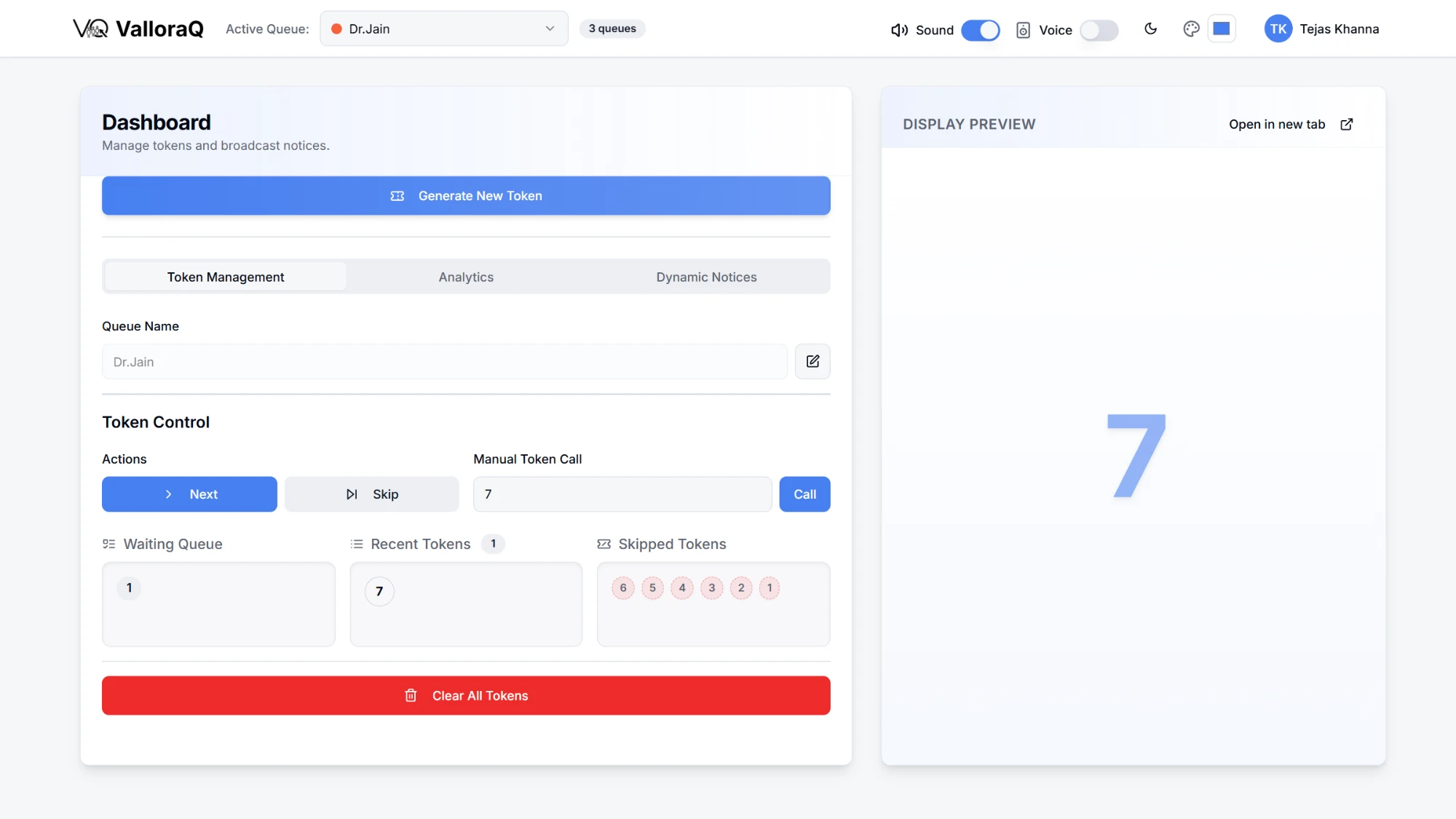
Live by the afternoon
- 01
Set up your queues
One per doctor or service, with capacity limits, working hours and priority rules.
- 02
Patients join
By scanning a QR code, at the desk, or at a kiosk. They can wait anywhere and track their place live.
- 03
Smart announcements
When it’s their turn, the AI voice calls the token, clear and unmissable, and the screen shows it.
- 04
Analyse and improve
Spot bottlenecks, staff to your busy hours and keep the waiting room calm.

ValloraQ Display for Windows
Runs the waiting-room screen on any Windows PC or TV.
Windows 10 or later · easy installation · auto-updates included · about 83 MB
Plans for every size of practice
Priced per location · quote with your demo
- Basic
Single-doctor practice
- One active queue
- Up to 100 tokens a day
- Local voice announcements
- Dynamic notices
- 7-day analytics
- Mobile app access
- Email support
- Standard
Up to three doctors
- Everything in Basic
- Up to 3 queues
- QR self check-in on 1 queue
- 300 tokens per queue a day
- Staff accounts per queue
- Custom branding
- Advanced
Polyclinic, up to six
- Everything in Standard
- Up to 6 queues
- QR check-in on every queue
- 500 tokens per queue a day
- Several display screens per queue
- Enterprise
Hospital OPD
- Everything in Advanced
- Unlimited tokens
- Dedicated support
- SLA guarantee
- Custom integrations
- Training included
Frequently asked questions
- What is ValloraQ?
- ValloraQ is a queue management system that replaces paper tokens and crowded counters with digital token generation, AI voice announcements, and real-time queue displays, so customers always know their place in line.
- Who uses a queue management system like ValloraQ?
- Clinics and hospital OPDs, banks, government offices, telecom and service centers, diagnostic labs, and retail counters — any business where customers wait for counter-based service benefits from organized digital queuing.
- How does ValloraQ announce tokens?
- ValloraQ uses AI voice announcements: when a counter calls the next token, the system speaks the token number and counter aloud in a clear, natural voice, alongside showing it on the waiting-area display screen.
- What hardware do I need to run ValloraQ?
- No proprietary hardware. Any Windows PC or TV can run the ValloraQ display app for the waiting area, and staff issue and call tokens from a normal browser on a PC, tablet, or phone.
- How much does ValloraQ cost?
- ValloraQ is priced per location based on counters and features. Contact info@kaelixtechnologies.com for a quote and a live demo.
- Can ValloraQ actually reduce customer wait times?
- Yes. Digital queuing removes line-cutting and confusion, lets staff balance load across counters, and gives customers visibility of their turn — which reduces both actual wait time and perceived wait time.
- Does ValloraQ work for businesses in India?
- Yes. ValloraQ is built by Kaelix Technologies with Indian clinics, banks, and service centers as a core market.
Scan your own clinic’s QR on a call with us.
Pick a time that suits you.